
What does Willhaben Job Scraper (Listing) do?
Collect job listings from willhaben, an Austrian classifieds platform, without writing code. Paste a filtered search URL, such as a search for Tischler (carpenters) in Vienna. The export gives you job titles, employers and links for comparing recruitment activity across roles and regions.
- Input: 1–20,000 search URLs, one per line, pasted directly into the input box.
- Output: 5 fields, including title, employer, listing information and job URL.
- Scope: 1–1,000 search results pages per URL, subject to available results.
- Runs: Local or cloud. Cloud runs require IP Proxy. Enable it in the Octoparse app. Where available, use a fixed proxy location in a German-speaking region.
- Cost: Free template. Octoparse IP Proxy is a paid option and uses credits at $3 per GB.
- Export: Excel, CSV, HTML, JSON or XML, with options to export to Google Sheets, databases or cloud storage.
Which willhaben template should you use?
Octoparse offers four free willhaben templates. Choose based on the page you want to collect and the fields you need.
| Template | Input | Cost | Best for |
|---|---|---|---|
| Willhaben Job Scraper (Listing) | Job search URL | Free | Job listings |
| Willhaben Job Scraper (Details) | Job ad URL | Free | Pay and employer data |
| Willhaben Auto Listing Scraper | Vehicle search URL | Free | Used-car asking prices |
| Willhaben Immobilien Listing Scraper | Rental search URL | Free | Asking rent per square meter |
From job search results to a pay comparison
- Collect job listings: Willhaben Job Scraper (Listing) returns job titles, employers and Job_URL from a willhaben search.
- Pass the job links to Details: Deduplicate Job_URL and pass up to 100 links per run to Willhaben Job Scraper (Details).
- Join the two exports: Match Job_URL in the Listing export to Original_URL in the Details export to add gross pay, pay period and employer profiles.
For a broader workflow, see Example workflow for collecting job listings.
How to use Willhaben Job Scraper (Listing)
- Open the template: Choose the option to try this template and sign in to Octoparse.
- Enter the URL: 1–20,000 search URLs, one per line, pasted directly into the input box.
https://www.willhaben.at/jobs/suche?keyword=Tischler&location=Wien®ion=14486 - Number of Pages: Set the maximum number of results pages per URL. Check a page of results to estimate the size of your export. Estimated listings ≈ pages × listings per page.
- Run the task: Local or cloud. Cloud runs require IP Proxy. Enable it in the Octoparse app. Where available, use a fixed proxy location in a German-speaking region. Octoparse IP Proxy is a paid option and uses credits at $3 per GB.
- Export: Save the data as Excel, CSV, HTML, JSON or XML. You can also export to Google Sheets, a database (SQL Server, MySQL, Oracle or PostgreSQL) or cloud storage (Google Drive, Dropbox or Amazon S3).
Tips for cleaner results
- Copy the filtered search URL: Enter a German job title and select a city or federal state on willhaben. Copy the entire URL from the results page and paste it into the template.
- Separate the date, employment type and location: In 02.07. | Vollzeit, Wien, 23. Bezirk, Liesing, split first at the vertical bar and then at the first comma after it. The values are 2 July, full-time and Vienna’s 23rd district, Liesing. Keep the remaining commas in the location.
- Deduplicate by job URL: Keep one row per Job_URL when merging searches. Keep identical titles with different URLs as separate ads.
Questions this data can answer
| Export fields | What you can learn |
|---|---|
| Titel (job title), Andere_Info (listing information) | Where are employers advertising the same kind of role? Recruiters can see which regions have more employers competing for similar candidates. |
| Arbeitgeber (employer), Titel (job title) | Which employers have posted several similar jobs? Staffing agencies can use those signals to prioritize prospective clients. |
| Titel (job title), Andere_Info (listing information) | Are comparable roles in a region mostly full-time, or are part-time ads also common? Use the mix to benchmark your own offer. |
| Job_URL (job URL), Arbeitgeber (employer) | Which employers have added listings since the last export? Compare repeated searches with the same filters to spot newly observed ads. |
Input and Output
Input
Output
Typical use cases
- Compare hiring demand by region: Staffing agencies can export carpenter vacancies in selected regions and see which employers are advertising several roles.
- Track new job listings: Recruiting teams can repeat a search, compare job links with the previous export and pass new links to the Details template for salary data.
Work with willhaben data in an AI assistant (MCP)
Octoparse MCP connects tools such as Claude, ChatGPT and Cursor to Octoparse. An assistant can filter, group and summarize results in the same conversation.
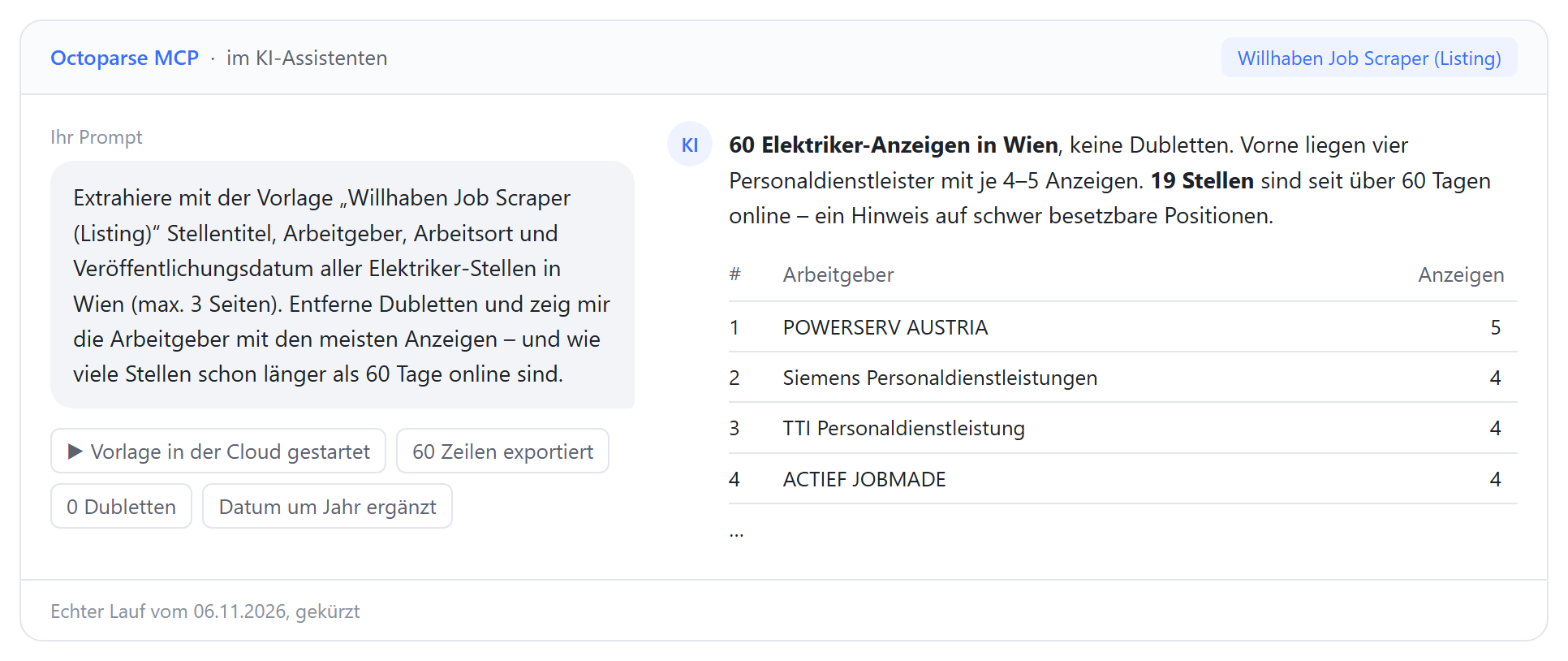
The card shows the original German-language run. You can copy the English prompt below.
Example prompt:
Use the Willhaben Job Scraper (Listing) template to extract job titles, employers, work locations and posting dates for electrician jobs in Vienna, up to three pages. Remove duplicates and show which employers have the most ads and how many listings have been online for more than 60 days.
Result: 60 listings after deduplication by Job_URL, all in Vienna. POWERSERV AUSTRIA had the most listings, with five. The analysis inferred the year from dates that omitted it.
- Collect: Get job titles, employers and job links in one run.
- Clean: Deduplicate listings by Job_URL.
- Analyze: Count postings by employer.
Frequently asked questions
How do I export jobs for different Austrian cities?
Set up one search per city and paste one URL per line. Eingabe_URL identifies the source search.
What is in Andere_Info?
The field combines posting date, employment type and work location. Posting dates may omit the year.
How does this differ from a willhaben job alert?
The job alert notifies you about matching postings. The template exports matching listings to a table you can filter, count or combine with other data.
Can I search in English?
Use German job titles such as Tischler (carpenter) or Elektriker (electrician). Search results and exported field names reflect the German source.
What does Willhaben Job Scraper (Listing) cost?
The template is free. Octoparse IP Proxy is a paid option and uses credits at $3 per GB. IP Proxy setup and pricing.
How do I run this template in the cloud?
Cloud runs require IP Proxy. Enable it in the Octoparse app. Where available, use a fixed proxy location in a German-speaking region. Octoparse IP Proxy is a paid option and uses credits at $3 per GB.
Why are some listings missing?
Open the input URL in your browser and check which listings are still available. Check the page limit as well.
Which field should I use to remove duplicates?
Use Job_URL as the key.
Do I need a willhaben API key?
The template takes publicly visible willhaben page URLs as input.
Can I use data from willhaben?
Collect publicly visible information and follow the platform’s terms and applicable privacy rules. Seek legal advice if you are unsure how those rules apply to your use. willhaben terms of use · Web scraping legal overview.
Can I request additional fields?
Use the support chat in the bottom-right corner and tell us which fields you need.